
Gi Odette
ShareID: gi-odette
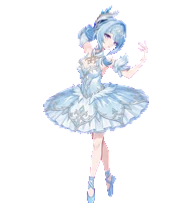
byml@may-leonThe prima ballerina of the Korolevskiy Troupe, clear and unyielding as the ice.
Install:
Installed to
Using Codex
Install Gi OdetteOpen in Codex DesktopPart ofGenshin Impact
characterfocusedmelancholic
Tip:BrowseDrag to move
Back to galleryID: gi-odette
byml@may-leonThe prima ballerina of the Korolevskiy Troupe, clear and unyielding as the ice.
Install:
Installed to
Using Codex
Install Gi OdetteOpen in Codex DesktopExplore every state
Browse each animation state to see how Gi Odette moves and reacts.
State viewer
Previewing the Idle animation loop.
Get Gi Odette
Adds Gi Odette to ~/.codex/pets/gi-odette.
Installed to
On Mac, use Terminal.app
Open Spotlight with Command + Space, type Terminal, then press Return.
Paste the command above and press Return.
Use /pet in Codex to wake or tuck it away.
Keep exploring

A "professional hunter" mastering the Snezhnayan snowfields. Beneath his calm demeanor, a fiercely distinct "ideal" seems to burn.

A tiny pixel-art muscular pink starfish pet with thick black brows, a stern face, and lime green purple shorts.

A friendly purple internet companion with a playful grin and a helpful spirit.

A shy pink-haired chibi guitarist Codex pet with a black guitar.