
Frieren 4
ShareID: frieren-4
byml@may-leonUma pequena maga elfa inspirada na Frieren, calma e curiosa.
Install:
Installed to
Using Codex
Install Frieren 4Open in Codex Desktopcharactercalmwholesomemysticalelfmagewizardanime-character

Tip:BrowseDrag to move
Back to galleryID: frieren-4
byml@may-leonUma pequena maga elfa inspirada na Frieren, calma e curiosa.
Install:
Installed to
Using Codex
Install Frieren 4Open in Codex DesktopExplore every state
Browse each animation state to see how Frieren 4 moves and reacts.
State viewer
Previewing the Idle animation loop.
Get Frieren 4
Adds Frieren 4 to ~/.codex/pets/frieren-4.
Installed to
On Mac, use Terminal.app
Open Spotlight with Command + Space, type Terminal, then press Return.
Paste the command above and press Return.
Use /pet in Codex to wake or tuck it away.
Keep exploring
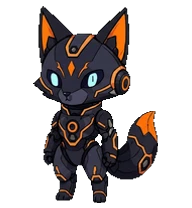
A calm cosmic research assistant with fox, cat, and robot traits.

A tiny movie-faithful EVE robot companion with expressive blue LED eyes, simplified into Codex digital pet style.

A whiter cream tabby Siamese cat with cool gray-brown points and blue eyes for Codex.

Learning companion with expressive chibi sprite poses.